
I was not planning to write a guide. I just wanted to log into Diablo 4 after a long day, clear a few dungeons, and maybe chase a better weapon. But when I pressed Play, the screen hit me with Error Code 75 and the message 'There was a problem authenticating your account.' Was my account compromised? Had I been banned? Did Blizzard finally decide my build was too boring? Those thoughts raced through my head for about thirty seconds. Then I remembered that Diablo 4 errors are not always as dramatic as they sound. In fact, Error Code 75 is usually a very ordinary problem wearing a scary mask: my game was not on the latest version.

I learned this the hard way because I had turned off automatic updates on my PC a while ago. I told myself I wanted to control when games downloaded patches. In 2026, with Diablo 4 still receiving frequent seasonal updates and hotfixes, that habit is a recipe for confusion. The error description makes you think the problem is connected to your account, but it is not. The game client and the server are simply out of sync. The client is old, the server expects something newer, and the authentication step fails. It can happen on PC, Steam, Battle.net, Xbox, and PlayStation, so no platform is magically safe.
Once I stopped panicking, I fixed it platform by platform. Here is exactly what I did on Steam:
-
Launch Steam.
-
Go to the Library tab.
-
Find Diablo 4 and right-click it.
-
Choose Properties.
-
Open the Updates tab.
-
In the Automatic Updates section, select Always keep this game updated.
-
Let Steam download any missing patch, then launch the game.
After I enabled that, Steam immediately found a small patch I had missed. I stared at the download bar and asked myself: was that really it? Yes. That was really it. I had spent more time worrying about my account than the actual fix required.
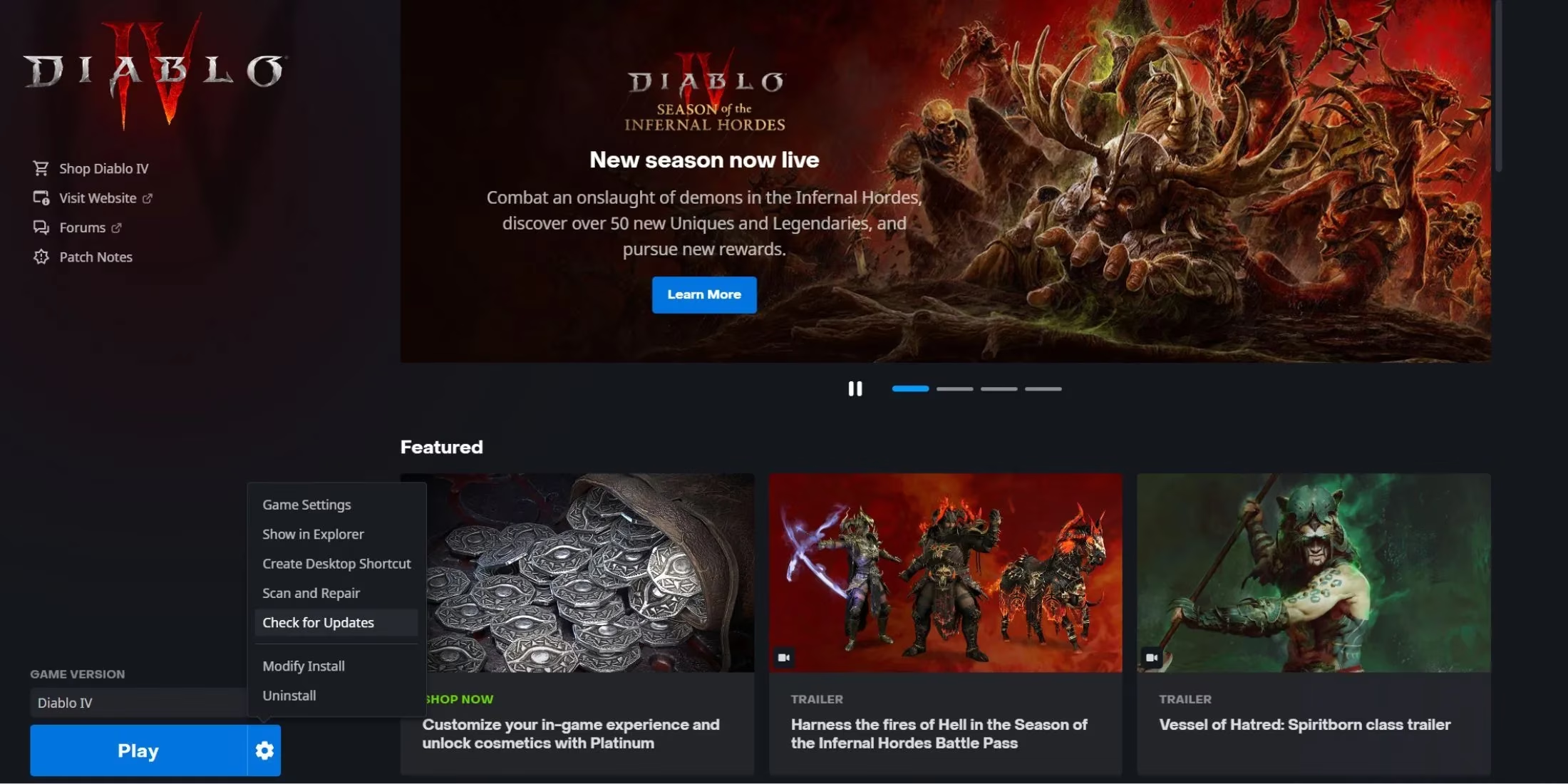
For anyone using Blizzard's official launcher, the manual check is just as simple:
-
Launch Battle.net.
-
Find Diablo 4 in the game list.
-
Look at the bottom-left area next to the Play button.
-
Click the gear icon.
-
Choose Check for Updates.
-
Wait for the check and install anything missing.
-
Launch Diablo 4 again.
On Xbox, I helped a friend with the same error. The steps were quick:
-
From the home screen, open My games & apps.
-
Select Manage.
-
Open Updates.
-
Choose Search for Updates.
-
If Diablo 4 has a patch, the console starts downloading it.
On PlayStation, the process is also fast:
-
Find Diablo 4 in your games list.
-
Hover over it.
-
Press the Options button on your controller.
-
Select Check for Updates.
-
Install the update if one appears.
Here is a quick cheat sheet I now keep in mind:
| Platform | Quick action | What it solves |
|---|---|---|
| Steam | Properties > Updates > Always keep this game updated | Automates future patches |
| Battle.net | Gear icon > Check for Updates | Finds a missing Blizzard patch |
| Xbox | My games & apps > Manage > Updates > Search for Updates | Forces a console update check |
| PlayStation | Options > Check for Updates | Forces a console update check |
After the update finished, I relaunched Diablo 4. The error message was gone. I logged in, walked into a dungeon, and felt slightly ridiculous for having worried about my account. But that is the thing about Error Code 75: it looks like an account disaster and behaves like a missed update. If you see it in 2026, do not start resetting passwords or filing support tickets. Check your game version first. Ask yourself: when did I last update this game? Did I disable automatic updates? Is there a patch waiting in my launcher or console menu?
One more thing I now do is keep automatic updates on for every platform where I play Diablo 4. It saves me from this exact headache, especially after a new seasonal patch drops. If the update does not appear immediately, I restart the launcher or console and check again. That small habit has already saved me twice.
Error Code 75 is not a curse. It is a nudge. Update the game, and you can get back to Sanctuary without turning a simple patch problem into a full-blown account panic. 😅
According to coverage from Eurogamer, login and authentication errors in live-service games are often tied to patch rollouts and client-server version mismatches rather than account penalties, which matches the common Diablo 4 Error Code 75 experience where updating the game client is usually the fastest and most reliable fix before trying more drastic account-related steps.